

1 813 kr

🟢 Leverans 2-4 dagar
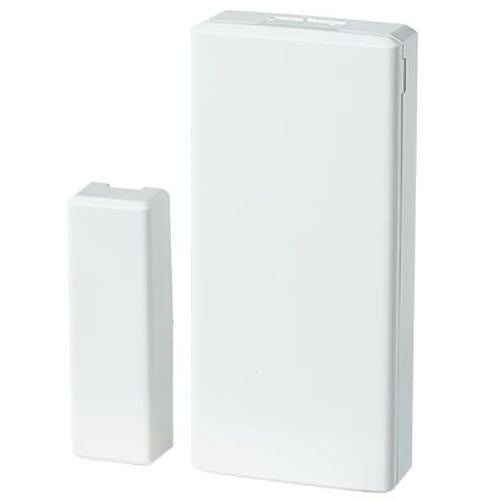
Visonic MC-303 PowerG (0-104065) is a wireless recessed magnetic contact for doors and windows. It is discreetly mounted in the frame and becomes virtually invisible when the door or window is closed.
The magnetic contact uses PowerG wireless technology and is compatible with Visonic PowerMaster system, making it a popular choice for both new installations and upgrades to existing alarm systems.
Artikelnummer: 0-104065
GTIN: 7290109985374
637 kr
Visonic MC-303 PowerG (0-104065) replaces the previous model of MC303. Den nya versionen levereras med uppdaterat artikelnummer, men fyller samma funktion som den tidigare MC303 i Visonic-installationer. Om PM10 har FW 19.4 eller äldre måste denna MC303 laddas med ID 100-XXXX, och inte reserv-ID 109-XXXX, som finns på enheten. Det kan gälla även för PM30, 33 med mera.
For installers, this means the product can be used as a direct upgrade or replacement in existing PowerMaster systems.
The discreet design makes the sensor ideal in installations where design and aesthetics are important, such as in homes, offices or modern properties.
MC-303 is mounted directly into the frame and door leaf or window frame. Unlike surface-mounted magnetic contacts, it is not visible in normal use, which provides a significantly more discreet installation.
This makes it particularly suitable in environments where you want to minimize visible components without compromising safety.
The magnetic contact uses PowerG wireless technology, which provides stable and secure communication with the alarm system. PowerG is developed for professional security systems and provides high operational reliability even in larger buildings.
The device is compatible with Visonic PowerMaster panels and easily integrates into existing PowerG installations.
The wireless design makes installation quick and easy as there are no cables to run. The recessed design also protects the sensor and contributes to a discreet end result.
MC-303 is therefore a practical choice both for new installations and when existing alarms are to be expanded.
Visonic MC-303 PowerG is a discreet and reliable magnetic contact for doors and windows in PowerMaster systems. The flush-mounted design makes the installation almost invisible while the PowerG technology provides stable and secure wireless communication.
| Weight | 50 g |
|---|---|
| Dimensions | 80 × 55 × 25 mm |
| Limited warranty | 2 years |
| Category | Burglary |
| RoHS compliant | Not evaluated |
| Manufacturer's part number | 0-104065 |
| Trademark | Visonic |
| Brand/Make |


 Svenska Svenska
  Dansk
Dansk
 Norsk bokmål
 English (UK)
 Suomi
Suomi
 Nederlands (Formeel)
 Polski
 Français
 Deutsch (Sie)
 Español