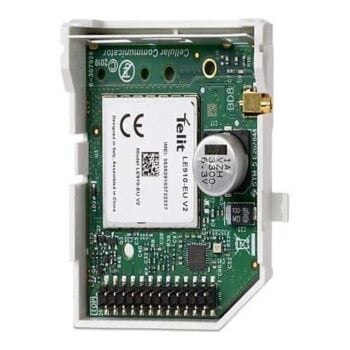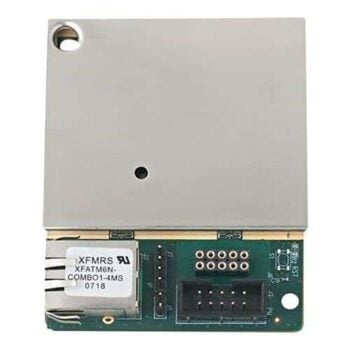

Visonic 4G/LTE Communication Module for PowerMaster 10/30/33

🟢 Delivery normally 2-4 days
Visonic 4G/LTE communication module upgrades PowerMaster 10, 30 and 33 to modern 4G communication.
Provides fast, stable and secure connection for reporting and remote control. Easy installation – replace the existing module with the new one. Compatible with version 18.04 or higher.
Item number: 9-103877
GTIN: 7290109980614
2990,00 kr
Take the opportunity to change the batteries and service the alarm?

Visonic 4G/LTE Communication Module for PowerMaster 10/30/33
The Visonic 4G/LTE communication module makes it easy to upgrade your existing PowerMaster 10, 30 or 33 alarm system to modern 4G communication.
The module replaces older 2G or 3G modules and ensures that your system continues to function even when the older mobile networks are phased out.
Installation is simple and can be done by yourself. The existing communication module is removed and replaced with the new original Visonic 4G module, which is mounted directly in the central unit. Clear installation instructions are included and no special tools are required.
The Visonic 4G/LTE module provides fast, stable and secure communication for both event reporting and remote control. It uses the LTE (4G) network as the primary communication path but can automatically switch when needed to ensure uninterrupted operation.
The module is compatible with PowerMaster 10, 30 and 33 (version 18.04 or higher) and supports communication via SIA/IP, SIA and Contact ID protocols.
Features and benefits
-
Easily upgrade from 2G/3G to 4G/LTE communication
-
Fast and stable connection for event reporting and remote control
-
Compatible with PowerMaster 10, 30 and 33 (version 18.04 or higher)
-
Easy installation – replace existing old module, manual and instructions included
-
Full two-way communication via SIA/IP, SIA and Contact ID
-
Possibility to connect external antenna for improved signal strength
-
Secure and future-proof solution when legacy networks are shut down
Specifications
-
Communication: 4G/LTE (compatible with 2G fallback)
-
Compatible control panels: PowerMaster 10, PowerMaster 30, PowerMaster 33 (version ≥ 18.04)
-
Protocol: SIA/IP, SIA, Contact ID
-
Mounting: Directly in the central unit
-
Power supply: Via central unit
-
Manufacturer: Visonic
-
Item number: 9-103877
How to check the version of your PowerMaster 10
To ensure that your control panel is compatible with this module (requires version 18.04 or higher), do the following:
-
Go to Installer menu on your PowerMaster 10.
-
Choose Serial number.
-
Press >>>key.
-
The last digits shown on the display indicate the firmware version. For example: “JS702271 I18.040″ = 18.04
If the version is 18.04 or higher, your control panel is compatible with the 4G module.
What is Visonic 4G/LTE communication module?
Why do I need to upgrade to 4G?
Which control panels are compatible?
How do I check what version my PowerMaster is?
Replaces the old communication module?
Is the installation difficult?
Are special tools needed for installation?
What type of communication does the module support?
Which alarm protocols are supported?
Can it be used to connect to an alarm center?
Can I remotely control my alarm via app?
Do I need a SIM card?
Does the module support external antenna?
What is included in the package?
Is this a future-proof solution?
You may also like…
-
Alarm control - Keypads, Visonic Alarm
Remote control KF-234 PG2 PowerG – Visonic
Varumärke: VisonicThe KF-234 PG2 is a four-button wireless remote control that makes it easy to control your Visonic PowerMaster alarm system.
With PowerG technology and up to 8 years of battery life, it is both reliable and safe.
SKU: 0-100959

Related products
-
Alarm transmitter IP / 4G
Alarm transmitter 4G Powermaster LTE Communicator for Pm360 / 360R – Visonic
 Alarm transmitter IP / 4G
Alarm transmitter 4G Powermaster LTE Communicator for Pm360 / 360R – Visonic
Varumärke: VisonicAlarm transmitter 4G Powermaster LTE Communicator is a 4G/LTE module for PowerMaster 360/360R.
It combines security, smart home automation and cloud-based control via the mobile app.
SKU: 9-103891 -
Alarm transmitter IP / 4G
IP module Powermaster – PowerLink 3.1 – 10 30 & 33 – Plug & Play – Visonic
Varumärke: VisonicPowerLink 3.1 is an IP module for PowerMaster systems that enables easy remote control and IP-based alarm communication.
Plug & Play solution.
Powermaster The central must be version 18 or later. Cannot be in the central while using a mobile / gprs module.
SKU: 9-103723 -
Alarm transmission 4G/IP, Alarm transmitter IP / 4G
SMA adapter cable for 4G antennas and mobile devices
Alarm transmission 4G/IP, Alarm transmitter IP / 4GSMA adapter cable for 4G antennas and mobile devices
Varumärke: SatelSMA Adapter cable with Versatile compatibility: Designed to connect antennas with an SMA connector, such as ANT-LTE-O and ANT-900/1800, to various mobile modules and alarm panels.
SKU: IPX-SMA