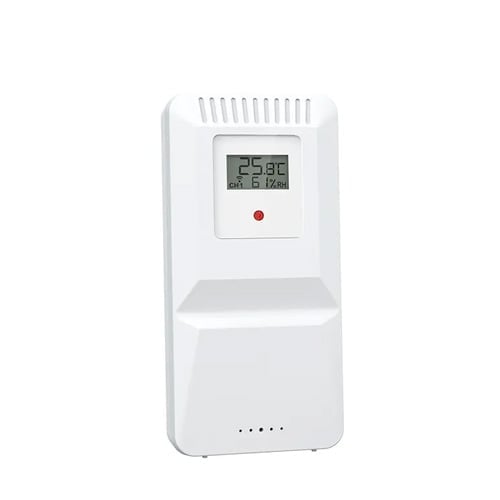
Temperature & humidity sensor for Wifi weather station
🟢 230 pcs in stock - Delivery 1-2 days
Extra temperature and humidity sensor that easily connects to your WiFi weather station with SKU: SMH-WEATHER (not for the SMH-WEATHER-Pro model)
Gives you accurate measurements in multiple rooms or outdoors with a range of up to 100 meters. Perfect for home, office, greenhouse or conservatory.
Item number: SMH-WEATHER-Sensor
109,00 kr
Used together with
Temperature & humidity sensor for Wifi weather station
This additional temperature and humidity sensor is the perfect complement to your WiFi weather station (SMH-WEATHER).
With a stable wireless transmission of up to 100 meters, you can easily place the sensor in different environments and get accurate readings directly on the indoor unit connected to the system.
The sensor records both temperature and humidity in real time and sends this data to your weather station. Thanks to the support for multiple channels (CH1, CH2, CH3), you can use multiple sensors simultaneously to monitor, for example, bedrooms, living rooms, basements, conservatories or outdoor climate.
Installation and placement is easy – the sensor can be either placed or hung on the wall. It is energy efficient and designed for reliable operation over a long period of time. The combination of multiple sensors gives you a complete picture of both the indoor and outdoor environment, which is especially valuable for those who want to keep track of comfort, energy savings and weather conditions.
Benefits and uses:
-
Get measurement data from multiple rooms or zones
-
Wireless range up to 100 meters
-
Multi-channel support (CH1–CH3)
-
Measures both temperature and humidity
-
Easy assembly – can be hung or placed upright
-
Suitable for home, office, conservatory, greenhouse, etc.
Technical specifications:
-
Functions: Temperature & humidity measurement
-
Wireless range: up to 100 m
-
Channels: CH1, CH2, CH3
-
Compatible with WiFi weather stations
- Batteries for operation: 2 x AA (not included but purchased separately)
What kind of sensor is this?
Which weather stations does the sensor work with?
How far does the sensor range?
How many sensors can be used simultaneously?
What batteries does the sensor use?
Can the sensor be used outdoors?
How do I install the sensor for the first time?
How do I connect the sensor to the weather station manually?
Where should the sensor be placed for the best measurement?
Why is there no temperature displayed from the sensor?
Vad är Stonehouse Smart
About Tuya Inc.: Tuya is a global IoT (Internet of Things) platform with approximately 5,000 employees worldwide. The company has been listed on the NYSE (New York Stock Exchange) under the ticker TUYA since 2021.
Related products
-
Smart Climate & Weather
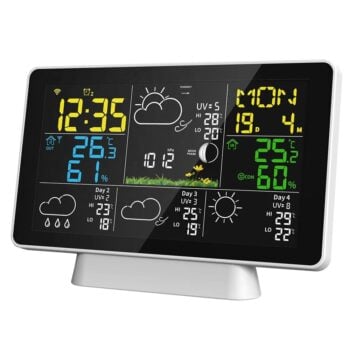
WiFi Weather Station – Smart and App Controlled – Keep track of the climate at home & via your mobile phone
 Smart Climate & Weather
WiFi Weather Station – Smart and App Controlled – Keep track of the climate at home & via your mobile phone
Varumärke: Stonehouse Smart-
4-day forecast online – automatically downloaded via Wi-Fi
-
Stonehouse Smart / Tuya / Smart Life (iOS/Android) – alarms, temperature graphs & push notifications
-
Indoor + outdoor climate – support for 3 wireless sensors (1 × included)
-
Temperature warning & 3 separate wake-up alarms – set in app or on device
-
Air pressure, UV index & moon phase directly on the screen
-
Power adapter + battery backup – Wi-Fi active with power adapter, 3 × AAA as a backup for the station.
-
3-step backlight or 10 s auto-illumination in battery operation
-
100 m sensor range (free line of sight) & 25 m to router
SKU: SMH-WEATHER -
-
Smart Climate & Weather
Wi-Fi Weather Station Pro – 7-in-1 sensor with wind, rain & UV – Smart & App-controlled
Smart Climate & WeatherWi-Fi Weather Station Pro – 7-in-1 sensor with wind, rain & UV – Smart & App-controlled
Varumärke: Stonehouse Smart-
4-day forecast on screen + up to 6 days in the Stonehouse Smart / Tuya app
-
Wi-Fi + Bluetooth Easy Pair – automatic date/time, graphs & push notifications
-
Wind 0–180 km/h & 0–359 ° – precise direction via internal compass
-
Rain gauge 0–9999 mm – rain warning adjustable (standard 50 mm/24 h)
-
Solar radiation 1–190 W/m² + UV index
SKU: SMK-WEATHER-PRO -